Parsing
Covers examples for parsing of TGA data from multiple manufacturers.
General
To import any type of TGA data, the parse_TGA function can be used for files from Perkin Elmer, Mettler Toledo, TA Instruments (Excel, TRIOS txt, and Q500 txt), and Netzsch.
[1]:
import pyTGA as tga
[2]:
import pyTGA as tga
import os
data_dir = os.path.abspath(os.path.join(os.getcwd(), '..', '..', '..', 'example_data'))
my_exp_MT = tga.parse_TGA(os.path.join(data_dir, 'manufacturers', 'MettlerToledo_example_file.txt'))
my_exp_PE = tga.parse_TGA(os.path.join(data_dir, 'manufacturers', 'PerkinElmer_example_file.txt'))
my_exp_TA = tga.parse_TA_excel(os.path.join(data_dir, 'manufacturers', 'TA_instrument_excel.xls'))
print('Manufacturer: ', my_exp_MT.manufacturer)
my_exp_MT.quickplot()
Manufacturer: Mettler Toledo
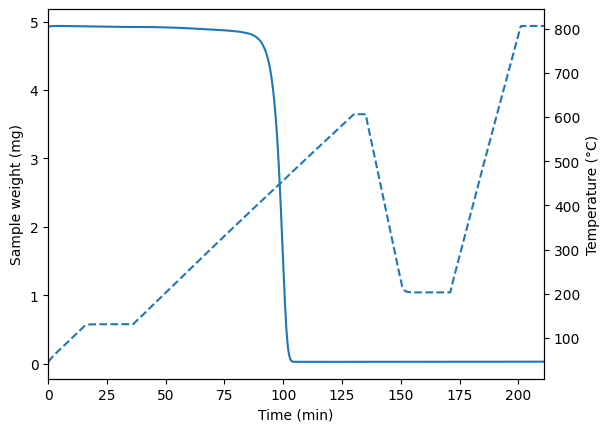
[3]:
my_exp_MT.full
[3]:
| Time | Sample Temp. | Reactor Temp. | Weight | Time(min) | |
|---|---|---|---|---|---|
| Index | |||||
| 0 | 0 | 45.647 | 50.000 | 4.929150 | 0.000000 |
| 1 | 1 | 45.699 | 50.083 | 4.929100 | 0.016667 |
| 2 | 2 | 45.774 | 50.167 | 4.929050 | 0.033333 |
| 3 | 3 | 45.825 | 50.250 | 4.928990 | 0.050000 |
| 4 | 4 | 45.911 | 50.333 | 4.928850 | 0.066667 |
| ... | ... | ... | ... | ... | ... |
| 12656 | 12656 | 805.929 | 800.000 | 0.028244 | 210.933333 |
| 12657 | 12657 | 805.935 | 800.000 | 0.028353 | 210.950000 |
| 12658 | 12658 | 805.930 | 800.000 | 0.028464 | 210.966667 |
| 12659 | 12659 | 805.929 | 800.000 | 0.028575 | 210.983333 |
| 12660 | 12660 | 805.934 | 800.000 | 0.028686 | 211.000000 |
12661 rows × 5 columns
However, its more efficient to use the designated function for each manufacturer:
[4]:
# for MT
my_exp_MT = tga.parse_MT(data_dir + '/manufacturers/MettlerToledo_example_file.txt')
# for PE
my_exp_PE = tga.parse_PE(data_dir + '/manufacturers/PerkinElmer_example_file.txt')
# for TA Instruments Excel
my_exp_TA = tga.parse_TA_excel(data_dir + '/manufacturers/TA_instrument_excel.xls')
# for TA Instruments TRIOS txt
my_exp_TA_txt = tga.parse_TA_txt(data_dir + '/manufacturers/TAInstruments_TRIOS_example_file.txt')
# for TA Instruments Q500 txt
my_exp_TA_txt_old = tga.parse_TA_txt_old(data_dir + '/manufacturers/TAInstruments_example_file.txt')
#for Netzsch
my_exp_Netzsch = tga.parse_Netzsch(data_dir + '/manufacturers/netzsch_example3.txt')
Perking Elmer
The Perkin Elmer file contains addtional information with the correct export settings. For example the method and calibration data, which allows to quickly verify both between files.
[5]:
print(my_exp_PE.method)
print(my_exp_PE.calibration)
Method:
Start the Run
        Action occurs Immediately
Switch the Gas to Nitrogen at 45.0 ml/min
        Action occurs Immediately
1)      Hold for 1.0 min at 50.00°C

2)      Heat from 50.00°C to 130.00°C at 5.00°C/min

3)      Hold for 20.0 min at 130.00°C

4)      Heat from 130.00°C to 600.00°C at 5.00°C/min

5)      Hold for 5.0 min at 600.00°C

6)      Cool from 600.00°C to 50.00°C at 500.00°C/min

7)      Hold for 20.0 min at 50.00°C

8)      Heat from 50.00°C to 800.00°C at 20.00°C/min
                Switch the Gas to Oxygen at 45.0 ml/min
                        Action occurs Immediately

9)      Heat from 800.00°C to 1000.00°C at 100.00°C/min

10)     Hold for 5.0 min at 1000.00°C
                Switch the Gas to Nitrogen at 45.0 ml/min
                        Action occurs Immediately


Calibration:
Calibration Type:       Multi-point Calibration

Ref. Material   Exp. Onset(°C)  Meas. Onset(°C)(at Rate1)       Meas. Onset(°C)(at Rate2)
Alumel                       154.200                 162.360                         165.650            Used
Nickel                       355.300                 359.690                         360.780            Used
Perkalloy                    596.000                 585.880                         591.810            Used
Iron                         770.000                 775.010                         778.540            Used
Cobalt                      1121.000                1121.000                        1121.000            Not Used

Rate 1:   5.0 °C/min
Rate 2:  20.0 °C/min

NEWPAGE

        WEIGHT CALIBRATION INPUTS:
Low Range
Reference Weight = 100.000 mg   Measured  Weight = 94.910 mg

WEIGHT CALIBRATION COMPUTED RESULTS:
Medium Range Factor = 1.054     Medium Range Offset = 48.942 mg Date: 03/02/2023 09:17:05


        TG DRIFT OPTIMIZATION
Minimum: 30.00 °C
Maximum: 1200.00 °C
Scan Rate: 20.0 °C/min

        REGISTER READOUTS:
R53:  +2.94228638e+002 +0.00000000e+000 +0.00000000e+000
R64:  +9.28329756409e-011 -2.85222508209e-007 +3.14076864519e-004 -1.48984974051e-001 +3.40418892973e+001 -1.13628530634e+005
R66:  -1.050533e-001 +3.186334e+001 -1.135919e+005 +8.990825e-002 -1.927006e+002 -3.274816e+003 3244 14327 200


        PROFILE VALUES FOR THIS DATA:

Software Version        13.3.3.0032
Firmware Version        TGA 8000 V2.06 Nov 11 2020
Instrument Serial Number        526B20120104
Load Temperature        30.0 °C
Go To Temp Rate 30.0 °C/min
Data taken using the    Low Range
Ordinate Filter On
The file is also divided into sections, allowing to extract the indivudal stages of the experiment quickly:
[6]:
print(my_exp_PE.stage_names())
print(my_exp_PE.stages['stage4'].head(3))
['stage1', 'stage2', 'stage3', 'stage4', 'stage5', 'stage6', 'stage7', 'stage8', 'stage9', 'stage10']
        Time  Unsubtracted weight  Baseline weight  Program Temp.  \
0  36.900000             6.924197              0.0          130.0
1  36.916667             6.924231              0.0          130.0
2  36.933333             6.924265              0.0          130.0

   Sample Temp.  Sample Purge Flow  Balance purge flow
0         130.0               44.9                70.0
1         130.0               44.8                70.0
2         130.0               44.9                70.0
Mettler Toledo
The Mettler Toledo file does not have the above mentioned features.
[7]:
print(my_exp_MT.method)
print(my_exp_MT.calibration)
print(my_exp_MT.stage_names())
None
None
['stage1']
To split the MT file into stages, a dict or csv file with indices for the individual stages needs to be supplied. The name of the stages can be customized.
[8]:
# using a dict
stage_split_dict = {'stage1': {'start_index': 0, 'end_index': 100},'second_stage': {'start_index': 100, 'end_index': 200}}
my_exp_MT_split = tga.parse_MT(data_dir + '/manufacturers/MettlerToledo_example_file.txt', stage_split=stage_split_dict)
print('with dict: ', my_exp_MT_split.stage_names())

# using a file
my_exp_MT_split = tga.parse_MT(data_dir+ '/manufacturers/MettlerToledo_example_file.txt', stage_split=stage_split_dict)
print('with dict: ', my_exp_MT_split.stage_names())

# using a file
my_exp_MT_split = tga.parse_MT(data_dir+ '/manufacturers/MettlerToledo_example_file.txt', stage_split=data_dir + '/stage_split_example.csv')

print('with csv: ',my_exp_MT_split.stage_names())
with dict:  ['stage1', 'second_stage']
with dict:  ['stage1', 'second_stage']
with csv:  ['stage1', 'stage2', 'stage3']
TA instruments
The TA instrument excel file allows for extraction of stages, but does not contain easily readable details about the method. However, additonal information can be obtained from the ‘Details’ sheet of the file.
[9]:
print(my_exp_TA.stage_names())
print(my_exp_TA.method)
print(my_exp_TA.calibration)

print('\nDetail sheet: ', my_exp_TA.details)
['stage1_Isothermal 60.0 min', 'stage2_Isothermal 5.0 min', 'stage3_Ramp 2.00 °Cmin to 550.00 °C', 'stage4_Isothermal 20.0 min', 'stage5_Ramp 100.00 °Cmin to 30.00 °C', 'full']
None
None

Detail sheet:                                                              value
label
Filename                                 TA_insturments_excel.xls
Instrument name                                               TGA
Operator                                                      NaN
rundate                                       2025-05-03 00:00:00
Sample name                                              Sample 1
...                                                           ...
Source Files 2   C:\XX\TA Instruments\TRIOS\TGA5500\xx\xx\xx..tri
Measured 1                                               156.0165
Known 1                                                    154.16
Measured 2                                               346.6409
Known 2                                                    357.22

[115 rows x 1 columns]
Netzsch
Netzsch files contain additional metadate which is also availible via the ‘.details’ method. Netsch files have stage support when it is included as ‘Segment’ in the file. The file only provides a relative weight, so the absolute weight is calculated from the sample mass.
[14]:
print('Netzsch metadata: \n', my_exp_Netzsch.details)
print('Netzsch stage names: \n', my_exp_Netzsch.stage_names())
print(my_exp_Netzsch.full.head(5))
Netzsch metadata:
 {'EXPORTTYPE': 'DATA ALL', 'FILE': 'CF-A_1000-ash.ngb-ds3', 'FORMAT': 'NETZSCH5', 'FTYPE': 'ASCII', 'IDENTITY': 'CF-A_1000-ash', 'DECIMAL': 'POINT', 'SEPARATOR': 'SEMICOLON', 'MTYPE': 'TG', 'INSTRUMENT': 'NETZSCH STA 449F3', 'PROJECT': '', 'DATE/TIME': '08.10.2024 15:04', 'CORR. FILE': 'blanc_1000_air.ngb-bs3', 'TEMPCAL': 'TCALZERO.TCX', 'SENSITIVITY': '---', 'LABORATORY': 'IJL', 'OPERATOR': 'TS', 'REMARK': '', 'SAMPLE': 'CF-A_1000-ash', 'SAMPLE MASS /mg': '4.28', 'MATERIAL': '', 'REFERENCE': '', 'REFERENCE MASS /mg': '', 'TYPE OF CRUCIBLE': 'DTA/TG crucible Al2O3', 'SAMPLE CRUCIBLE MASS /mg': '0', 'REFERENCE CRUCIBLE MASS /mg': '', 'TG RANGE /mg': '35000', 'TAU-R': '---', 'CORR. CODE': '020', 'EXO': '-1', 'RANGE': '37›C/15,0(K/min)/1000›C/00:00/1000›C/', 'SEGMENT': 'S1-2/2', 'SEG. 1': '37›C/15,0(K/min)/1000›C', 'SEG. 2': '1000›C/00:30/1000›C', 'skiprows': 34}
Netzsch stage names:
 ['stage1', 'stage2']
     Temp  Time     Mass/%  Gas Flow(purge2)/(ml/min)  \
0  31.061  0.00  100.00000                       50.0
1  31.045  0.01  100.00000                       50.0
2  31.073  0.02  100.00000                       50.0
3  31.057  0.03   99.95327                       50.0
4  31.057  0.04   99.95327                       50.0

   Gas Flow(protective)/(ml/min)  Segment  Weight
0                           40.0        1   4.280
1                           40.0        1   4.280
2                           40.0        1   4.280
3                           40.0        1   4.278
4                           40.0        1   4.278