Quickstart
This notebook will help you get started with pyTGA quickly. It covers reading data (using Perkin Elmer files as an example), accessing different stages of an experiment, calculating a derivative and simple calculations.
Hint: If you are using Mettler Toledo files, check out the parsing notebook (under ‘Usage’) first. You can also directly download these notebooks from the GitHub repository of this project.
Loading the package using the command below. If you did not install it using pip, make sure the folder ‘TGA_utils’ is in the same directory as your script.
[1]:
import os
import pyTGA as tga
import pandas as pd
import numpy as np
import matplotlib.pyplot as plt
The TGA_exp class
In its simplest form, the package parses the whole experiment as an instance of the ‘TGA_exp’ class. To look at the method utilized, you can print it using ‘.method’. You get the individual stages of the experiment as pandas dataframe using the .stages[‘stage_name’] method. As a default, all the stages are just labeled ‘stage1’, ‘stage2’ etc. To obtain the full data of the experiment in one frame, use the .full attribute.
[2]:
data_dir = os.path.abspath(os.path.join(os.getcwd(), '..', '..', '..', 'example_data'))
my_exp = tga.parse_txt(os.path.join(data_dir, 'burnoff_example.txt'), exp_type='general')
print('Date:', my_exp.date)
print('Time:', my_exp.time)
print(my_exp.method)
print(my_exp.stage_names())
print(my_exp.stages['stage2'].head(2))
#for full:
# print(my_exp.full.head(2))
Date: 26/10/2021
Time: 14:40:00
Method:
Start the Run
        Action occurs Immediately
Switch the Gas to Oxygen at 45.0 ml/min
        Action occurs Immediately
1)      Hold for 1.0 min at 30.00°C

2)      Heat from 30.00°C to 800.00°C at 10.00°C/min

3)      Hold for 1.0 min at 800.00°C
                Switch the Gas to Nitrogen at 45.0 ml/min
                        Action occurs Immediately


['stage1', 'stage2', 'stage3']
       Time  Unsubtracted weight  Baseline weight  Program Temp.  \
0  0.916667             8.795345              0.0           30.0
1  0.933333             8.795107              0.0           30.0

   Sample Temp.  Sample Purge Flow  Balance purge flow
0         30.05               44.9                70.0
1         30.05               44.9                70.0
For quickly plotting the whole experiment, use the quickplot method.
[3]:
my_exp.quickplot()

Units
The units of the default weight, time and temperature colums are accesible as follows:
[4]:
print('time unit: ', my_exp.time_unit)
print('temperature unit: ', my_exp.temp_unit)
print('weight unit: ', my_exp.weight_unit)
time unit:  min
temperature unit:  °C
weight unit:  mg
Trimming stages
Often we only want to use part of a stage, for example if a material loses water. For this we can use the trim_stage method, specifying the temperature range we want to use.
[5]:
my_exp.trim_stage('stage2',temp_range = [200,750])
print(my_exp.stages['stage2'].head(5))
   index       Time  Unsubtracted weight  Baseline weight  Program Temp.  \
0   1029  18.066667             8.709263              0.0         200.69
1   1030  18.083333             8.709229              0.0         200.85
2   1031  18.100000             8.709195              0.0         201.02
3   1032  18.116667             8.709161              0.0         201.19
4   1033  18.133333             8.709093              0.0         201.35

   Sample Temp.  Sample Purge Flow  Balance purge flow
0        200.05               44.9                70.0
1        200.21               44.9                70.0
2        200.37               44.9                70.0
3        200.54               44.9                70.0
4        200.71               44.9                70.0
Often we want to calculate the derivative of the weight loss profile. We can do this using the calc_DTGA_stage function. With x and y you can specify in what units to calculate the derivative. You can use ‘Time’ or ‘Temp’ for the x-axis, or ‘absolute’ and ‘relative’ for the y axis. As a default you can use the temperature and the relative sample weight.
Calculating a derivative
[6]:
my_exp = tga.calc_DTGA_stage(my_exp,'stage2',x='Temp',y='relative')
print(my_exp.stages['stage2'].head(5))
   index       Time  Unsubtracted weight  Baseline weight  Program Temp.  \
0   1029  18.066667             8.709263              0.0         200.69
1   1030  18.083333             8.709229              0.0         200.85
2   1031  18.100000             8.709195              0.0         201.02
3   1032  18.116667             8.709161              0.0         201.19
4   1033  18.133333             8.709093              0.0         201.35

   Sample Temp.  Sample Purge Flow  Balance purge flow  DTGA_Temp_relative
0        200.05               44.9                70.0                 NaN
1        200.21               44.9                70.0                 NaN
2        200.37               44.9                70.0                 NaN
3        200.54               44.9                70.0                 NaN
4        200.71               44.9                70.0                 NaN
Now let’s plot the profile:
[7]:
fig, ax = plt.subplots()
ax2 = ax.twinx()
df_TGA = my_exp.stages['stage2']
ax.plot(df_TGA['Sample Temp.'],df_TGA['DTGA_Temp_relative']*100,linestyle='--')
ax2.plot(df_TGA['Sample Temp.'],df_TGA['Unsubtracted weight']/df_TGA['Unsubtracted weight'].max()*100)
ax.set_xlim([200,750])
ax.set_ylim(0,)

ax.set_xlabel('Temperature (°C)')
ax.set_ylabel('DTGA (% rel. weight/°C)')
ax2.set_ylabel('Sample weight (%)')
plt.show()

Now let’s determine the coke content by comparing the maximum and minimum weight during the experiment:
[8]:
def get_coke_content(stage):
    catweight = stage['Unsubtracted weight'].min()
    cokeweight = stage['Unsubtracted weight'].max() - catweight
    return cokeweight/(catweight+cokeweight)

coke_content = get_coke_content(my_exp.stages['stage2'])
print('Coke content is',np.round(coke_content*100,3), '%')
Coke content is 3.0 %
And determine the coke burnoff temperature:
[9]:
def calc_Tmax(stage):
    DTGA_cols = [col for col in stage.columns if 'DTGA' in col] #looking for the first DTGA column, in case there are multiple
    Tmax = stage['Sample Temp.'].iloc[stage[DTGA_cols[0]].idxmax()]
    return Tmax

Tmax = calc_Tmax(my_exp.stages['stage2'])
print('Tmax is',Tmax,'°C')
Tmax is 546.83 °C
Subclasses: Plastic Pyrolysis
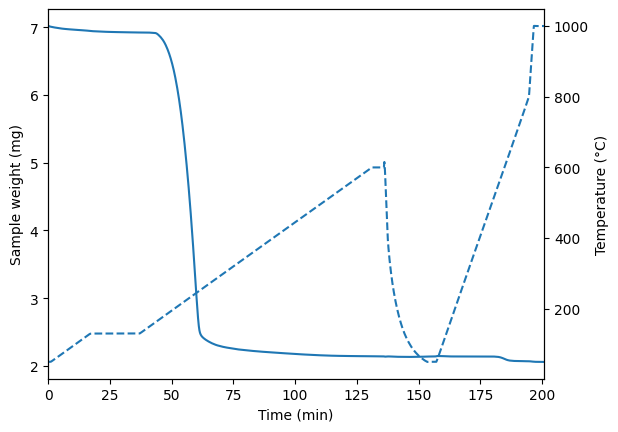
This is a rather simple experiment. Let’s try a more complicated, 2 stage plastic cracking experiment, where we first dry the catalyst, then crack the polymer, and finally burn off the coke. You can see the thermogram for the whole experiment below. Here the important bits are stage 4 where the cracking happens, and stage 8 where the burnoff happens (these are the default values). For these experiments we can make a new subclass ‘TGA_pyro’, that makes these stages easily accessible and includes calculation of parameters we might use often, e.g. the mass of the catalyst or the T50 temperature. When you want to change which stage is assigned to cracking or burnoff, you can use tga_exp.cracking_stage_name = ‘stage4’ etc.
[10]:
tga_exp = tga.parse_TGA(data_dir+'/plastic_cracking_example.txt',exp_type='pyro',calculate_DTGA=True)
tga_exp.cracking_stage_name = 'stage4'
tga_exp.burnoff_stage_name = 'stage8'
print(tga_exp.method)
tga_exp.quickplot()
tga_exp.T50 = tga.calc_T50(tga_exp.cracking()) # calculate T50 for the cracking stage
print( 'T50 in cracking is ' + '{} °C'.format(tga_exp.T50))
Method:
Start the Run
        Action occurs Immediately
Switch the Gas to Nitrogen at 45.0 ml/min
        Action occurs Immediately
1)      Hold for 1.0 min at 50.00°C

2)      Heat from 50.00°C to 130.00°C at 5.00°C/min

3)      Hold for 20.0 min at 130.00°C

4)      Heat from 130.00°C to 600.00°C at 5.00°C/min

5)      Hold for 5.0 min at 600.00°C

6)      Cool from 600.00°C to 50.00°C at 500.00°C/min

7)      Hold for 20.0 min at 50.00°C

8)      Heat from 50.00°C to 800.00°C at 20.00°C/min
                Switch the Gas to Oxygen at 45.0 ml/min
                        Action occurs Immediately

9)      Heat from 800.00°C to 1000.00°C at 100.00°C/min

10)     Hold for 5.0 min at 1000.00°C
                Switch the Gas to Nitrogen at 45.0 ml/min
                        Action occurs Immediately
T50 in cracking is 230.89 °C
This allows to access the important stages directly:
[11]:
print('Pyrolysis part:')
print(tga_exp.cracking().head(5))
print('Burnoff part:')
tga_exp.burnoff().head(5)
Pyrolysis part:
         Time  Unsubtracted weight  Baseline weight  Program Temp.  \
6   37.000000             6.924367              0.0         130.04
7   37.016667             6.924367              0.0         130.13
8   37.033333             6.924401              0.0         130.21
9   37.050000             6.924401              0.0         130.29
10  37.066667             6.924435              0.0         130.38

    Sample Temp.  Sample Purge Flow  Balance purge flow  rel_weight_twl  \
6         130.02               44.9                70.0        0.999892
7         130.04               44.9                70.0        0.999892
8         130.09               44.9                70.0        0.999897
9         130.15               44.9                70.0        0.999897
10        130.22               44.9                70.0        0.999902

    rel_weight_pwl  DTGA_pwl  DTGA_twl
6         0.999846       NaN       NaN
7         0.999846       NaN       NaN
8         0.999853       NaN       NaN
9         0.999853       NaN       NaN
10        0.999860       NaN       NaN
Burnoff part:
[11]:
| Time | Unsubtracted weight | Baseline weight | Program Temp. | Sample Temp. | Sample Purge Flow | Balance purge flow | rel_weight_twl | rel_weight_pwl | DTGA_pwl | DTGA_twl | |
|---|---|---|---|---|---|---|---|---|---|---|---|
| 1 | 157.115641 | 2.140062 | 0.0 | 50.0 | 50.0 | 44.9 | 70.0 | 0.997924 | 0.015035 | NaN | NaN |
| 2 | 157.132308 | 2.140266 | 0.0 | 50.0 | 50.0 | 44.8 | 70.0 | 0.998019 | 0.015077 | NaN | NaN |
| 3 | 157.148974 | 2.140436 | 0.0 | 50.0 | 50.0 | 44.9 | 70.0 | 0.998098 | 0.015112 | NaN | NaN |
| 4 | 157.165641 | 2.140606 | 0.0 | 50.0 | 50.0 | 44.9 | 70.0 | 0.998177 | 0.015147 | NaN | NaN |
| 5 | 157.182308 | 2.140810 | 0.0 | 50.0 | 50.0 | 44.9 | 70.0 | 0.998272 | 0.015189 | NaN | NaN |
With methods of the class we can obtain all other parameters of interest. You can make your own subclass and specify methods for it as required.
[12]:
results = np.array([tga_exp.m_cat(),tga_exp.m_poly(),tga_exp.coke_yield()])
np.round(results,3,results)
print('Catalyst weight', results[0], 'mg')
print('Polymer weight', results[1], 'mg')
print('Coke yield', results[2]*100, '%')
print('Tmax cracking', tga.calc_Tmax_exp(tga_exp, 'cracking'), '°C')
print('Tmax coke burnoff', tga.calc_Tmax_exp(tga_exp, 'burnoff'), '°C')
Catalyst weight 2.067 mg
Polymer weight 4.858 mg
Coke yield 1.5 %
Tmax cracking 245.0 °C
Tmax coke burnoff 611.05 °C
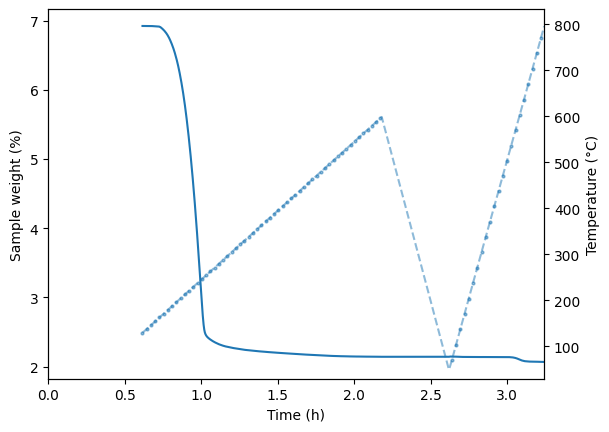
What if we want to just look at the whole experiment? For this we can use the .full attribute. Alternatively, you can combine all stages using the keyword ‘all’, or supply it with a list of stages e.g. [‘stage1’,’stage2’]
[13]:
#Option 1
fig, ax = plt.subplots()
ax2 = ax.twinx()
ax.plot(tga_exp.full['Time']/60,tga_exp.full['Unsubtracted weight'])
ax2.plot(tga_exp.full['Time']/60,tga_exp.full['Sample Temp.'],linestyle='--')
ax.set_xlabel('Time (h)')
ax.set_ylabel('Sample weight (%)')
ax2.set_ylabel('Temperature (°C)')
ax.set_xlim(0,tga_exp.full['Time'].max()/60)
ax2.set_ylim(30,)
plt.show()

[14]:
#Option 2
tga_exp.combine_stages(['stage4', 'stage8'],new_stage_name='combined')
fig, ax = plt.subplots()
ax2 = ax.twinx()
ax.plot(tga_exp.stages['combined']['Time']/60,tga_exp.stages['combined']['Unsubtracted weight'])
ax2.plot(tga_exp.stages['combined']['Time']/60,tga_exp.stages['combined']['Sample Temp.'], linestyle='--', marker='o',markersize=2, markevery=100,alpha=0.5)
ax.set_xlabel('Time (h)')
ax.set_ylabel('Sample weight (%)')
ax2.set_ylabel('Temperature (°C)')
ax.set_xlim(0,tga_exp.stages['combined']['Time'].max()/60)
ax2.set_ylim(30,)
plt.show()
[15]:
tga_exp = tga.parse_TGA(data_dir+'/plastic_cracking_example.txt',exp_type='pyro',calculate_DTGA=True)
print(tga_exp.method)
tga_exp.quickplot()
tga_exp.T50 = tga.calc_T50(tga_exp.cracking()) # calculate T50 for the cracking stage
print( 'T50 in cracking is ' + '{} °C'.format(tga_exp.T50))
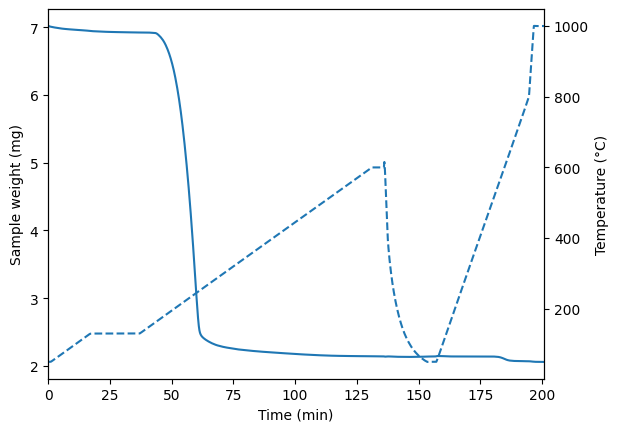
Method:
Start the Run
        Action occurs Immediately
Switch the Gas to Nitrogen at 45.0 ml/min
        Action occurs Immediately
1)      Hold for 1.0 min at 50.00°C

2)      Heat from 50.00°C to 130.00°C at 5.00°C/min

3)      Hold for 20.0 min at 130.00°C

4)      Heat from 130.00°C to 600.00°C at 5.00°C/min

5)      Hold for 5.0 min at 600.00°C

6)      Cool from 600.00°C to 50.00°C at 500.00°C/min

7)      Hold for 20.0 min at 50.00°C

8)      Heat from 50.00°C to 800.00°C at 20.00°C/min
                Switch the Gas to Oxygen at 45.0 ml/min
                        Action occurs Immediately

9)      Heat from 800.00°C to 1000.00°C at 100.00°C/min

10)     Hold for 5.0 min at 1000.00°C
                Switch the Gas to Nitrogen at 45.0 ml/min
                        Action occurs Immediately
T50 in cracking is 230.89 °C